Paystub Template: Free Pay Stub Layout for Employers
Copy a free paystub template for hourly or salaried employees, with a filled-in 2026 sample, the fields California and New York require, and mistakes to avoid.
This guide is general information, not legal advice. Employment rules vary by location; check the official source for yours.
A pay stub is the statement that shows an employee how their paycheck was worked out: what they earned, what came off, and what they took home. The template below is a plain layout you can paste into a doc or a spreadsheet and fill in from your payroll records each payday.
Quick answer
- Every stub should show: employer and employee details, the pay period and pay date, earnings line by line, each deduction, and gross and net pay.
- For hourly staff, add hours and rates for regular time and overtime.
- Add year-to-date totals so the employee can check their pay over the year.
- Show only the last four digits of a Social Security number, or an employee ID.
- Use real figures only. Every amount must match what was actually paid.
Paystub template
This paystub template works for hourly and salaried employees. Delete the lines you don’t use, such as overtime for a salaried employee.
[Company legal name]
[Street address, City, State ZIP]
[Company phone number]
Earnings statement
| Employee | Pay details |
|---|---|
| Name: [Employee full name] | Pay period: [Start date] to [End date] |
| Employee ID: [ID or last four digits of SSN] | Pay date: [Pay date] |
| Job title: [Job title] | Pay frequency: [Weekly / Biweekly / Semimonthly / Monthly] |
| Address: [Employee mailing address] | Pay basis: [Hourly / Salary] |
Earnings
| Description | Hours | Rate | Current | Year to date |
|---|---|---|---|---|
| Regular pay | [Hours] | [$ per hour] | [$ amount] | [$ amount] |
| Overtime pay | [Hours] | [$ per hour] | [$ amount] | [$ amount] |
| [Other: bonus, commission, PTO, holiday] | [Hours] | [Rate] | [$ amount] | [$ amount] |
| Gross pay | [$ total] | [$ total] |
Deductions
| Description | Current | Year to date |
|---|---|---|
| Federal income tax | [$ amount] | [$ amount] |
| Social Security | [$ amount] | [$ amount] |
| Medicare | [$ amount] | [$ amount] |
| [State income tax] | [$ amount] | [$ amount] |
| [Local income tax] | [$ amount] | [$ amount] |
| [401(k) or other retirement] | [$ amount] | [$ amount] |
| [Health, dental, or vision premium] | [$ amount] | [$ amount] |
| [Other: garnishment, after-tax deduction] | [$ amount] | [$ amount] |
| Total deductions | [$ total] | [$ total] |
Summary
| Current | Year to date | |
|---|---|---|
| Gross pay | [$ amount] | [$ amount] |
| Total deductions | [$ amount] | [$ amount] |
| Net pay | [$ amount] | [$ amount] |
Payment method: [Direct deposit to account ending in XXXX / Check number]
Paid sick leave or PTO available: [Hours] (check local rules)
Questions about this statement: [Payroll contact name or role, email]
The tables paste into Google Sheets or Excel as rows and columns, so you can add formulas for the totals. If you’d rather produce a finished PDF, the free payslip generator builds one in your browser from the same fields.
How do you fill in a pay stub?
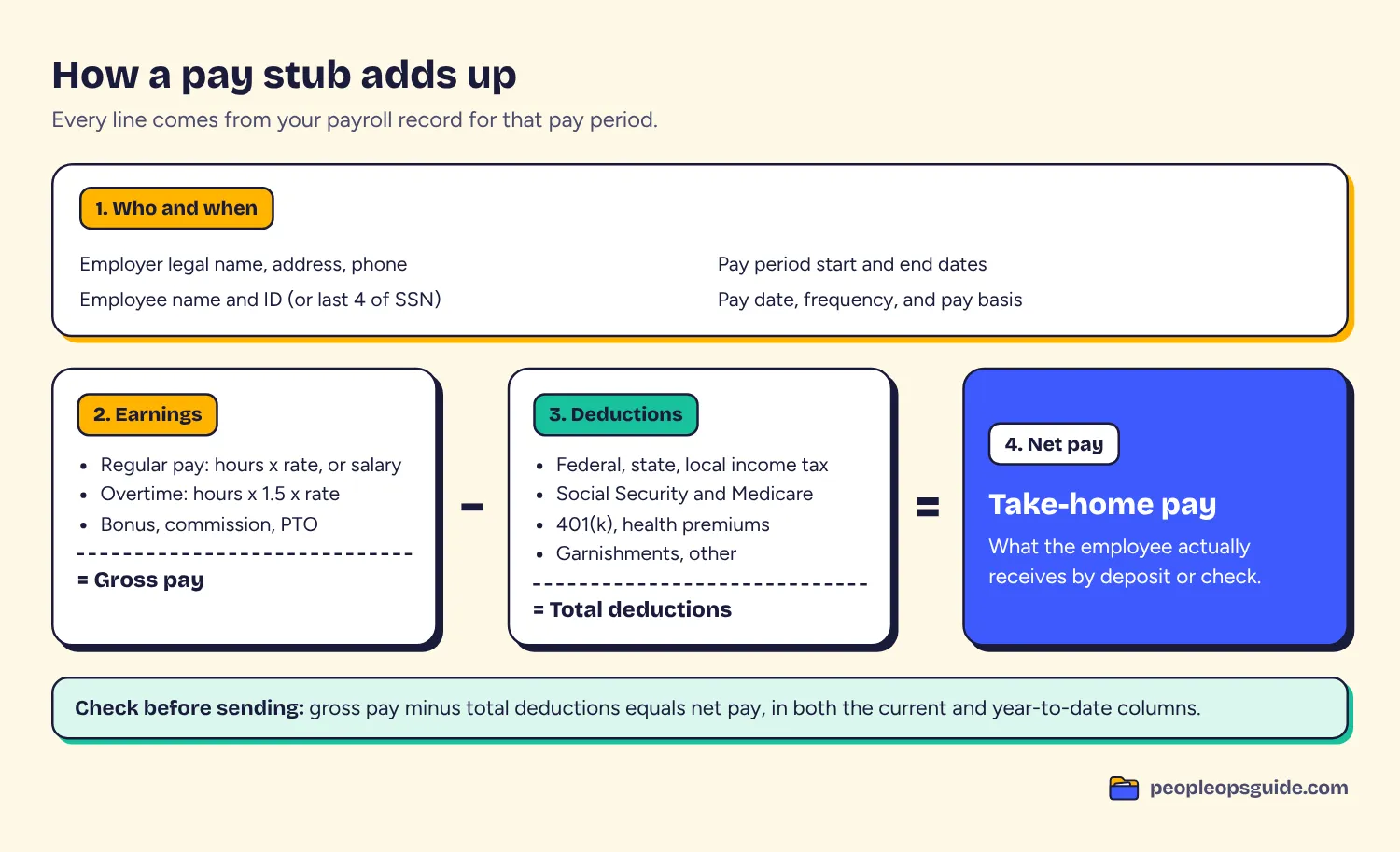
A pay stub is filled in from your payroll calculation or your accountant’s report, never from memory. The stub is a summary of that record, so the two should match to the cent.
Employer and employee details
- Company legal name and address: use the legal entity that pays the employee, not just a trading name. A phone number helps, and New York requires it.
- Employee name and ID: use an employee ID number, or only the last four digits of the Social Security number.
- Pay basis and frequency: hourly or salary, and how often you pay. This tells the employee how to read the rest.
Pay period and pay date
The pay period is the span of days the work covers, such as November 1 to November 14. The pay date is when the money is paid. They’re different dates, and both belong on the stub.
Earnings
- Regular pay: hours times the hourly rate, or the salary amount for the period (annual salary divided by the number of pay periods).
- Overtime: under the federal Fair Labor Standards Act, nonexempt employees get at least time and one-half their regular rate for hours over 40 in a workweek. Some states add daily overtime. The overtime calculator can check this line.
- Other earnings: bonuses, commission, paid time off, and holiday pay each get their own line so they’re easy to check.
Deductions
- Federal income tax: the amount withheld based on the employee’s Form W-4 and the IRS withholding tables. Use the figure your payroll calculation produces.
- Social Security and Medicare: for 2026, employees pay 6.2% for Social Security on wages up to $184,500 and 1.45% for Medicare, with no wage cap on Medicare. Employers also withhold an extra 0.9% Medicare tax on wages over $200,000 in a calendar year.
- State and local taxes: add a line only where your state or city taxes wages.
- Benefits and retirement: 401(k) contributions and health premiums, each on its own line.
- Other deductions: wage garnishments and anything else the employee authorized in writing.
Totals and year-to-date
Gross pay minus total deductions should equal net pay, in both the current and year-to-date columns. If it doesn’t, find the error before the stub goes out. Year-to-date totals run from the first pay date of the calendar year.
What does the law require on a pay stub?
A pay stub isn’t required by federal law, but some states require one, including California (Labor Code 226) and New York (Labor Law 195).
Federal rules: the US Department of Labor says the FLSA doesn’t require employers to give pay stubs. It does require records for each nonexempt employee, including hours worked each day and week, the basis of pay, the regular rate, straight-time and overtime earnings, additions and deductions, total wages, and the pay date and period. Payroll records must be kept for at least three years, and timecards for two. A stub built from the template above lines up with that list.
State rules go further. Two common examples:
| California (Labor Code 226) | New York (Labor Law 195) |
|---|---|
| Gross wages | Employer name, address, and phone number |
| Total hours worked | Employee name |
| Piece-rate units and rates, if paid by piece | Dates the payment covers |
| All deductions | Basis of pay, such as hourly or salary |
| Net wages | Regular and overtime pay rates |
| Inclusive dates of the pay period | Regular and overtime hours worked |
| Employee name and last four SSN digits or an employee ID | Allowances or credits claimed |
| Name and address of the legal entity that is the employer | Gross wages |
| Every hourly rate in effect and the hours worked at each | Deductions |
| Net wages |
Sources: California Labor Code section 226(a) and the New York State Department of Labor’s wage statement guidance, both checked November 2026. California employers must also keep copies of wage statements for at least three years, and show available paid sick leave on the pay stub or in a separate writing given on payday.
Check local rules
Other states can set their own pay statement rules, including what the stub must show, whether employees can get it electronically, and how long you keep copies. Check your state labor department before you settle on a format.
Filled-in sample
This sample pay stub is the template filled in for an hourly employee paid biweekly who worked 40 hours in the first week and 45 in the second. The company, the employee, and the federal income tax figure are made up. Real withholding comes from the employee’s W-4 and your payroll calculation.
Sample pay stub
Harbor Lane Bakery LLC
210 Elm Street, Austin, TX 78701
(512) 555-0142
Earnings statement
| Employee | Pay details |
|---|---|
| Name: Jordan Sample | Pay period: November 1, 2026 to November 14, 2026 |
| Employee ID: 0047 | Pay date: November 20, 2026 |
| Job title: Baker | Pay frequency: Biweekly |
| Pay basis: Hourly |
| Earnings | Hours | Rate | Current | Year to date |
|---|---|---|---|---|
| Regular pay | 80.00 | $20.00 | $1,600.00 | $36,800.00 |
| Overtime pay | 5.00 | $30.00 | $150.00 | $3,450.00 |
| Gross pay | $1,750.00 | $40,250.00 |
| Deductions | Current | Year to date |
|---|---|---|
| Federal income tax (sample figure) | $98.00 | $2,254.00 |
| Social Security (6.2%) | $108.50 | $2,495.50 |
| Medicare (1.45%) | $25.38 | $583.74 |
| 401(k) (4%) | $70.00 | $1,610.00 |
| Total deductions | $301.88 | $6,943.24 |
| Current | Year to date | |
|---|---|---|
| Net pay | $1,448.12 | $33,306.76 |
Payment method: Direct deposit to account ending in 4471
How the numbers work:
- Overtime: 5 hours over 40 in the second week, at 1.5 times $20, is $150.
- Social Security and Medicare are figured on the full $1,750: 6.2% is $108.50 and 1.45% is $25.375, rounded to $25.38.
- Net pay: $1,750.00 minus $301.88 is $1,448.12.
- Year to date: this sample assumes 23 identical pay periods so far, so each YTD figure is 23 times the current one. Real YTD totals come from your payroll history.
- No state income tax line appears in the sample. Add state and local lines if they apply to you.
Variations
Salaried employee
Replace the hours and rate columns with one line: “Salary, [annual salary] per year” and the amount for the period. For a $62,400 salary paid biweekly, that’s $2,400 per paycheck (62,400 divided by 26). If the employee is nonexempt and paid a salary, keep the hours lines, because overtime still applies.
Corrected pay stub
If a stub was wrong, don’t edit the old one. Issue a new stub marked “Corrected” with the original pay date, the right figures, and a one-line note on what changed. Keep both copies with your payroll records.
Contractor payment statement
Independent contractors aren’t employees, so they don’t get an employee pay stub, and you normally don’t withhold taxes from their payments. If a contractor wants a record, send a simple statement instead:
[Company legal name]
[Street address, City, State ZIP]
Payment statement
Paid to: [Contractor or business name]
Invoice number: [Invoice number] dated [Invoice date]
Services: [Short description]
Amount paid: [$ amount]
Payment date: [Payment date]
Payment method: [ACH / Check number]
No taxes were withheld from this payment.
What are the most common pay stub mistakes?
Pay stub mistakes come from six habits that are easy to fix:
- Printing the full Social Security number. Use the last four digits or an employee ID.
- Leaving out hours for hourly staff. Without hours and rates, an employee can’t check their pay, and states like California and New York require them.
- Folding overtime into regular pay. Give overtime its own line with the hours and the rate.
- Year-to-date totals that don’t add up. Update YTD from the payroll record every period instead of typing it fresh.
- Mixing up the pay period and the pay date. Both appear on the stub, and they’re almost never the same day.
- Making a stub for pay that wasn’t paid. A stub is a record, not a promise. If an employee needs proof of their job rather than proof of pay, write an employment verification letter instead.
Final thoughts
A plain stub that matches your payroll record to the cent beats a fancy design every time. Start with the template, add the lines your state asks for, and keep a copy of every stub you issue. Once you’re paying more than a handful of people each period, payroll software usually takes over this job, since it calculates withholding and produces stubs automatically.
Get new HR templates and tools by email
New templates, plain-English guides, free tools, and HR rule changes worth knowing. About twice a month; unsubscribe any time.
Used only to send the newsletter. Privacy policy
You’re on the list. The first email is on its way soon.
Frequently asked questions
Is it legal to make your own pay stubs?
Yes, if you're the employer and the stub records pay you actually issued. Many small businesses make their own from a template or a spreadsheet. What's illegal is creating a stub with figures that were never paid, for example to help someone qualify for a loan or a lease. That's fraud, whoever makes it.
Do I have to give employees a pay stub?
Not under federal law. The US Department of Labor says the FLSA doesn't require pay stubs, though it does require accurate records of hours and pay. Many states do require a pay statement each payday, including California and New York, and they list what it must show. Check your state labor department.
Can I use this template in Excel or Google Sheets?
Yes. Copy the template and paste it into a blank sheet; the tables land as rows and columns. Add simple formulas for gross pay, total deductions, and net pay so the totals can't drift from the line items.
Should a pay stub show the employee's full Social Security number?
No. California allows only the last four digits or an employee ID number on the wage statement, and that's a sensible rule everywhere. A pay stub gets emailed, printed, and handed to landlords, so keep the full number in your payroll records only.
Do 1099 contractors get pay stubs?
Not in the employee sense. Contractors invoice you and you pay the invoice, usually with no tax withheld. A short payment statement that lists the invoice, amount, and date is useful for both sides, but don't format it like an employee pay stub.
How long should I keep copies of pay stubs?
Federal rules require payroll records to be kept for at least three years, and the timecards behind them for two. California requires employers to keep copies of wage statements for at least three years. Keep each stub with the payroll record for that pay period, and check your state's retention rules.
Found this useful? Get the next one by email
New templates, plain-English guides, free tools, and HR rule changes worth knowing. About twice a month; unsubscribe any time.
Used only to send the newsletter. Privacy policy
You’re on the list. The first email is on its way soon.
More in Letters and templates
Employment Verification Letter: Free Template and Sample
Copy a free employment verification letter template for current or former employees, plus an authorization form, a filled-in sample, and what to leave out.
Offer Letter Template: Free, Editable Job Offer Letter
Copy a free offer letter template for full-time, hourly, or email offers, plus a contingency clause, a filled-in sample, and what to leave out.
Termination Letter Template: Free Samples for Employers
Copy a free termination letter template for performance, conduct, or layoff exits, plus a filled-in sample and the state notices to send with it.